
Clients book on their own. You see a full calendar.
תור בקליק gives your business one link for booking appointments. The client picks a service and a time that is really free, you see the day at a glance, and a reminder goes out from your WhatsApp with one tap. You sign up on your own and start working.
- ₪0 Free up to 60 appointments a monthOne calendar · Permanently
- ₪49per month Unlimited appointmentsUp to 3 calendars · Basic plan
- ₪89per month Unlimited appointmentsUnlimited calendars · Team plan
Prices include VAT. No credit card and no commitment.
One appointment, from the link to the chair
This is how one appointment looks in the system. The messages shown here are the real wording the client gets, from the business WhatsApp.
-
The client books
BookedThe client opens the business link, chooses a service, day and time, and leaves a name and phone. The appointment goes into the calendar, and you send a confirmation with one tap.
The message the client gets Hi Michal, your appointment at Noa's Studio is booked: tomorrow at 10:30, Gel polish. Details, changes or cancellation: (personal link to the appointment page)
-
A reminder the day before
BookedThe evening before, the "Today" screen shows tomorrow's appointments. Tapping next to each client opens your WhatsApp with the reminder ready.
The message the client gets Hi Michal, a reminder: you have an appointment tomorrow at 10:30 at Noa's Studio, Gel polish. To confirm, change or cancel: (personal link to the appointment page)
-
The client confirms they are coming
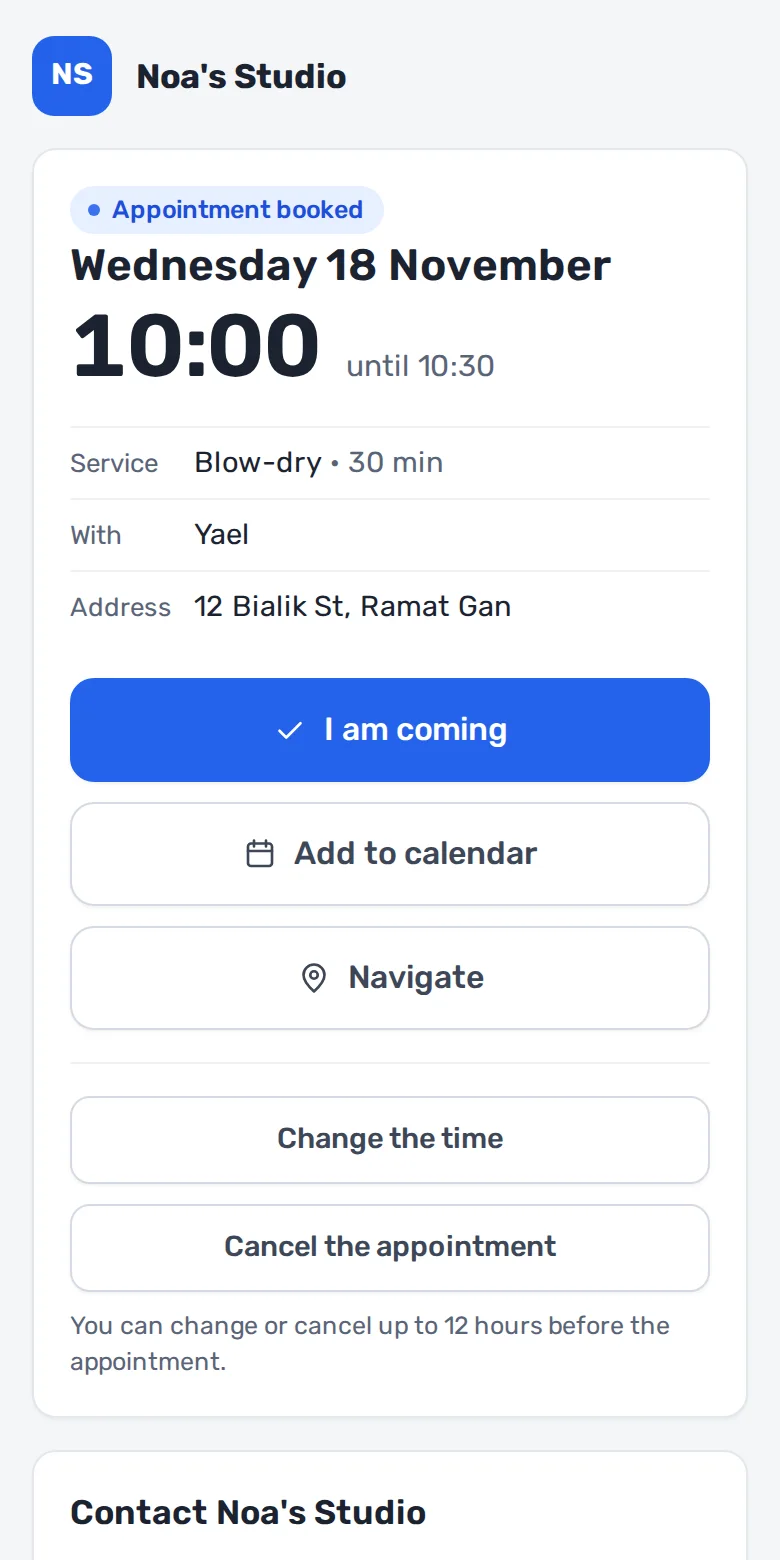
ConfirmedThe link in the reminder leads to the client appointment page. There they confirm they are coming, move the appointment or cancel, up to the cut-off you set.
What you see in the system On the appointment page: an "I am coming" button, add to phone calendar and navigation.
-
The appointment is done
DoneAfter the appointment you mark "Done" or "No-show", and "Paid" if you want. The client card keeps when they came, with whom and which service.
What you see in the system On the appointment card: the "Next appointment" button books the client for next time, with the same service.

What the client sees
One page on the phone. No app to download and no password.
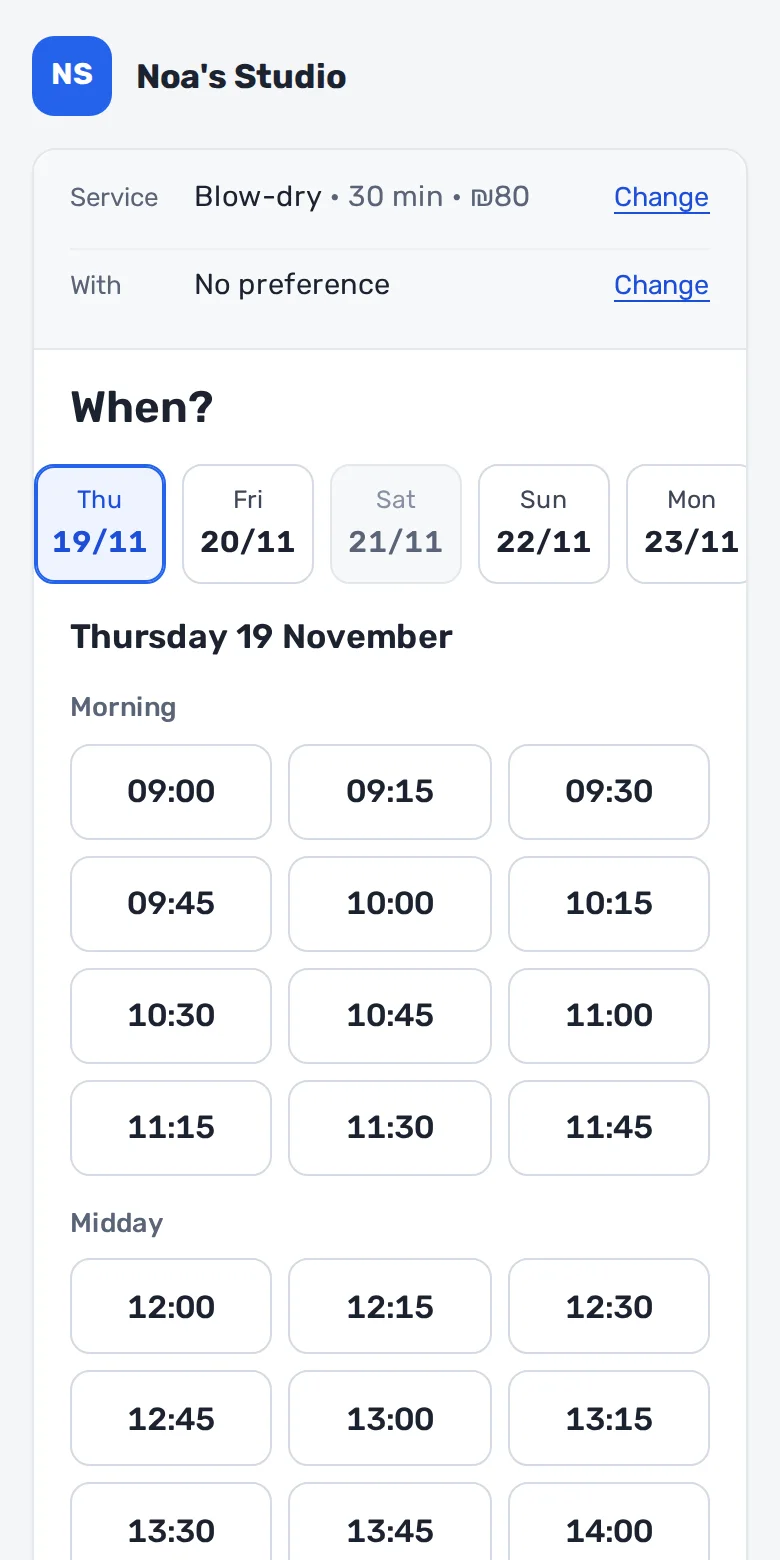
- Only times that are really free, based on working hours, breaks and appointments already booked.
- A choice of team member, or "No preference".
- A personal appointment page: confirm attendance, add to the phone calendar and navigate.
- Cancel and move on their own, up to the cut-off the business sets.
- A full day? The client joins the waiting list for that day.
The client never sees the business notes, other clients or history.
Your day at a glance
Who is next, who is after, and where there is a gap. Next to them, what is waiting for you: new appointments from the website, reminders for tomorrow, and appointments not yet marked as done.

A time shown as free is free
One engine decides what is free, both on your screen and on the client page. It knows what an ordinary calendar misses.
- A wait inside a service: while the colour sets, you can book another client.
- Time after the appointment for cleaning and preparation, not offered to clients.
- A calendar and working hours for each team member, with breaks, time off and blocks.
- Holidays by the Hebrew calendar: the business closes on its own, and you can turn it off.
- A recurring appointment every few weeks, at the same time even after the clocks change.
- Two clients tapping the same time: one gets it, and the other chooses another time.
For every business that works with appointments
You choose a sector when you sign up and get a ready list of services, with a length for each. You can change the names, lengths and prices at any time.
- Barber
- Starting with these services: Haircut, Haircut and beard, Beard, Kids haircut
- Hair salon and styling
- Starting with these services: Blow-dry, Haircut, Colour, Straightening
- Nails
- Starting with these services: Gel polish, Infill, Nail extensions, Pedicure
- Brows and lashes
- Starting with these services: Brow shaping, Lash lift, Lash extensions, Lash infill
- Cosmetics and facials
- Starting with these services: Facial, Extended facial, Deep cleansing
- Aesthetics and injectables
- Starting with these services: Consultation, Botox, Hyaluronic acid, Follow-up
- Hair removal
- Starting with these services: Laser, small area, Laser, medium area, Laser, large area, Waxing
- Makeup
- Starting with these services: Evening makeup, Bridal makeup, Bridal makeup trial
- Massage and spa
- Starting with these services: 60-minute massage, 90-minute massage
- Tattoo and piercing
- Starting with these services: Consultation, Small tattoo, Tattoo session, Piercing
- Dog grooming
- Starting with these services: Wash and groom, small dog, Wash and groom, medium dog, Wash and groom, large dog
- Other business with appointments
- Starting with these services: Meeting
Pricing
You start free, and stay free as long as it is enough. You move to a paid plan when you need more appointments or more calendars.
| Plan | Price per month | Appointments and calendars |
|---|---|---|
| Free | ₪0 | Up to 60 appointments a monthOne calendar |
| Basic | ₪49 | Unlimited appointmentsUp to 3 calendars |
| Team | ₪89 | Unlimited appointmentsUnlimited calendars |
A paid plan is paid by transfer (Bit or bank), for 31 days at a time. There is no automatic charge: a business that does not renew goes back to the free plan, and appointments already booked stay.
Every plan includes
- A business page with a booking link
- Daily and weekly calendar, on phone and computer
- Services with length, price, time after and wait
- Working hours, breaks, time off and holidays
- Recurring appointments
- Client card with visit history
- One-tap WhatsApp messages, with fixed wording
- A personal appointment page for the client: confirm, move and cancel
- Waiting list
- The calendar in your phone calendar
- "Paid" mark and a report for a period
- Hebrew, English and Russian
What the system does not have yet
So you do not find out after signing up.
- Automatic reminders
- Today every message is sent with one tap, from the business WhatsApp. Automatic sending from a central number is being built.
- Phone verification by code
- A client books with a name and phone, with no verification code. You can set appointments from new clients to wait for your approval.
- Payments, deposits and invoices
- The system does not collect money and does not issue invoices. You mark "Paid" and how, for your records only.
- Paying for the subscription by credit card
- You pay for the plan by transfer, for 31 days at a time, and we approve it manually.
Frequently asked questions
How much does it cost?
תור בקליק: free, up to 60 appointments a month, one calendar; ₪49 a month, unlimited appointments, up to 3 calendars; ₪89 a month, unlimited appointments, unlimited calendars. Prices include VAT.
Is it really free?
Yes. The free plan is permanent, up to 60 appointments a month, and no credit card is needed.
Do clients need to download an app?
No. They open a link in their phone browser, choose a service and time, and leave a name and phone.
How do clients get a reminder?
You tap a button next to the appointment, and your WhatsApp opens with the message ready. Automatic sending does not exist yet.
What happens when a client cancels?
The client cancels or moves the appointment on their own from their appointment page, up to the cut-off you set, for example 12 hours before. After the cut-off they contact you, and the cancellation is recorded on their card as a late cancellation.
Can I work with several team members?
Yes. Each team member has their own calendar, working hours and services, and the client chooses with whom. The number of calendars depends on the plan.
Do I need a website for this?
No. Every business gets a page with its own link, which you can send on WhatsApp or put in your Instagram bio.
Can I see the appointments in my phone calendar?
Yes. Each calendar has a private address, which you add once to your phone calendar. The appointments update there on their own, sometimes with a delay of a few hours.
What happens when the quota runs out?
At 80% of the quota a warning appears. When the quota is full you have 3 more days in which you can keep booking appointments. After that you cannot book new appointments until next month, or until you switch plans. Appointments already booked are not affected.
Is there a commitment?
No. There is no automatic charge and no commitment period. A business that does not renew goes back to the free plan.
Your calendar can be open today
Signing up takes a minute: business name, sector and login details.
- ₪0 Free up to 60 appointments a monthOne calendar · Permanently